Reactivity
JoltUI does not diff a virtual DOM. Templates declare which parts depend on which data, and when
that data changes JoltUI re-evaluates just those parts. This page covers the data-bind
mechanism and the three decorators built on it: @react, @reactFactory and @queryParam.
Bound regions
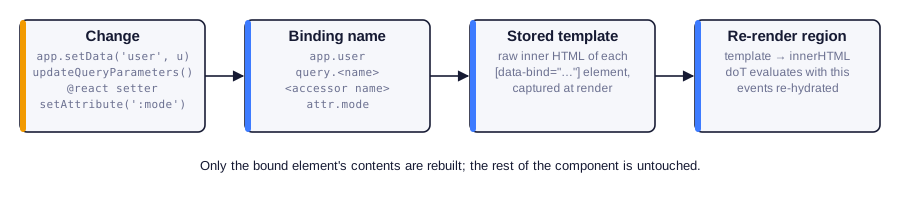
Any element in a template can be marked with data-bind="<binding name>". When the component
renders, JoltUI remembers the raw template of that element's contents. When the binding is
invalidated, it evaluates the stored template again and replaces the element's contents.
override markup = () => html`
    <header>
        <h1>Inbox</h1>
        <span class="badge" data-bind="app.unread">
            {{= this.app.getData("unread") }}
        </span>
    </header>
    <message-list></message-list>
`;
Calling app.setData("unread", 3) anywhere in the application updates the badge and nothing
else. The header, the heading and <message-list> are not touched.
Several elements may use the same binding name; they all refresh together. Regions can be nested: when the outer region refreshes, the inner one is rebuilt with it.
Binding names
| Binding | Invalidated by |
|---|---|
app.<field> |
app.setData("<field>", …) |
query.<name> |
a change of query parameter <name> through the App |
attr.<name> |
changing attribute data-jolt-<name> (or :<name>) on the component's host element |
| any other name | a @react / @reactFactory property, or this.invalidate(name) |
Rules for bound regions
A region is re-evaluated on its own, outside the context of the full template:
- Reference only
thisand globals inside a region. Loop variables ({{~ list :item }}) and variables declared in{{ }}code outside the region do not exist when the region is refreshed. Put the loop inside the region, not the region inside the loop. - Use
{{= }}and{{! }}, not${}. Template-literal values are fixed whenmarkup()runs. - Write the attribute with double quotes:
data-bind="app.user". - Keep template code out of table structure. JoltUI stores a region's template by parsing it
as HTML, and the HTML parser moves text that appears directly inside
<table>,<tbody>or<tr>(such as a{{~ }}loop around rows) out of the table. The first render looks right; the refresh does not. Inside bound regions, build lists with<ul>/<li>or grid-styled<div>elements, or bind a region inside a table cell. - Child components inside a region are recreated when it refreshes. Keep stateful children outside frequently changing regions.
Event handlers inside a region keep working: the refreshed contents are hydrated again.
Application data: app.<field>
override markup = () => html`
    <nav>
        <a href="/">Stories</a>
        <a href="/about">About</a>
        <div class="navbar-actions" data-bind="app.user">
            {{? this.app.getData("user") }}
                <a class="btn" href="/profile">Profile</a>
            {{??}}
                <a class="btn" href="/login">Sign in</a>
            {{?}}
        </div>
    </nav>
    <main id="page-content"></main>
`;
When the login page calls this.app.setData("user", user), the navigation updates without the
layout or the page being re-rendered.
Query parameters: query.<name>
Parameters changed with app.updateQueryParameters() or the queryParameters setter notify
bindings named after the parameter:
override markup = () => html`
    <div class="filters">
        <button @click="setCategory" :category="All">All</button>
        <button @click="setCategory" :category="Design">Design</button>
    </div>

    <div data-bind="query.category">
        {{~ this.filteredPosts :post }}
            <article>{{! post.title }}</article>
        {{~}}
    </div>
`;

get filteredPosts(): Post[] {
    const category = this.app.queryParameters.category;
    return this.posts.filter(post => !category || post.category === category);
}

setCategory(_event: Event, args: { category: string }): void {
    this.app.updateQueryParameters({
        category: args.category === "All" ? null : args.category,
    });
}
The URL changes (?category=Design) and the list refreshes. Because the state is in the URL, it
survives a reload and works with the Back button.
Attributes: attr.<name>
A component can bind markup to its own host attributes. Whenever data-jolt-<name> changes on
the host, regions bound to attr.<name> refresh:
@component({ tagName: "status-dot" })
export default class StatusDot extends CustomElement<MyApp> {
    override markup = () => html`
        <span data-bind="attr.status">
            <i class="dot dot-{{= this.args.status }}"></i> {{= this.args.status }}
        </span>
    `;
}
const dot = this.querySelector("status-dot");
dot?.setAttribute(":status", "offline");   // refreshes the region
dot?.toggleAttribute(":status");           // removal also counts
setAttribute, removeAttribute and toggleAttribute all trigger the refresh, but only when the
value actually changes. Only the contents of the bound element are re-evaluated, not its own
attributes; put dynamic classes on an inner element.
Component state: @react
@react(initialValue, bindingName?) turns an accessor field into reactive state. Assigning a
new value invalidates the binding, which by default has the property's name:
import { react } from "joltui";

@component({ tagName: "todo-list" })
export default class TodoList extends CustomElement<MyApp> {
    @react([] as string[])
    accessor items!: string[];

    @react("")
    accessor draft!: string;

    override markup = () => html`
        <form @submit="add">
            <input name="item" @input="typing" placeholder="New item">
            <button>Add</button>
        </form>
        <p data-bind="draft">Typing: {{! this.draft }}</p>
        <ul data-bind="items">
            {{~ this.items :item }}<li>{{! item }}</li>{{~}}
        </ul>
    `;

    typing(event: Event): void {
        this.draft = (event.target as HTMLInputElement).value;
    }

    add(event: Event): void {
        event.preventDefault();
        if (!this.draft) return;
        this.items = [...this.items, this.draft];
        (event.currentTarget as HTMLFormElement).reset();
        this.draft = "";
    }
}
- Each instance gets its own copy of the initial value, cloned with
structuredClone, so@react([])does not share one array between instances. - Assignment triggers, mutation does not. The setter compares values with
Object.is.this.items.push(x)notifies nobody; writethis.items = [...this.items, x], or callthis.invalidate("items")after the mutation. - Custom binding names let one property drive a differently named region, or several
properties share one:
@react(0, "totals"). - The
accessorkeyword is required. It is part of the standard decorators proposal and lets the decorator intercept reads and writes.
Non-cloneable initial values: @reactFactory
structuredClone cannot copy functions, class instances with private state or DOM nodes. For
such values, supply a factory that produces a fresh value for every instance:
import { reactFactory } from "joltui";

@reactFactory(() => new Map<number, Post>())
accessor postCache!: Map<number, Post>;

@reactFactory(() => new ShoppingCart(), "cart")
accessor cart!: ShoppingCart;
Manual invalidation
this.invalidate(name) refreshes every region bound to name in this component. Use it for state
that is not held in a decorated property:
private readonly selected = new Set<number>();

toggle(_event: Event, args: { id: number }): void {
    if (!this.selected.delete(args.id)) this.selected.add(args.id);
    this.invalidate("selection");
}
Query parameters as properties: @queryParam
@queryParam(name, defaultValue?, bindingName?) exposes a query parameter as a string property.
Reading it returns the current value (or the default); writing it calls
app.updateQueryParameters():
import { queryParam } from "joltui";

@page({ path: "/search", title: "Search" })
@component({ tagName: "search-page" })
export default class SearchPage extends CustomElement<MyApp> {
    @queryParam("q", "", "query.q")
    accessor q!: string;

    @queryParam("page", "1", "query.page")
    accessor page!: string;

    override markup = () => html`
        <input value="{{! this.q }}" @change="search">
        <div data-bind="query.q">Results for "{{! this.q }}"</div>
        <nav data-bind="query.page">
            Page {{= this.page }}
            <button @click="next">Next</button>
        </nav>
    `;

    search(event: Event): void {
        this.q = (event.target as HTMLInputElement).value;
        this.page = "1";
    }

    next(): void {
        this.page = String(Number(this.page) + 1);
    }
}
Setting the property to null removes the parameter (declare the property as string | null
and omit the default to allow that).
Which binding name?
Writing the property already fires the query.<name> event through the App. If you omit the
third argument, the decorator additionally invalidates a local binding called query-<name>.
Passing "query.<name>" as the binding name, as above, avoids the second refresh and keeps
one consistent name for every region that depends on the parameter.
Choosing a tool
| Situation | Tool |
|---|---|
| State shared by several components | application data + app.<field> bindings |
| State that belongs in the URL (filters, paging, tabs) | @queryParam or updateQueryParameters + query.<name> |
| State local to one component | @react / @reactFactory |
| A parent configuring a child at runtime | host attributes + attr.<name> |
| One component telling another to act | a direct method call |
| Anything else | a plain field + invalidate(name) |
| The whole component depends on one data field | dataField in @component |