Architecture
This page introduces the main building blocks, shows how they are wired together and follows an application from startup to the first rendered page.
The building blocks
| Part | Role |
|---|---|
App |
The application object. Owns the container element, shared data, query parameters, the template cache, lifecycle hooks and the error handlers. |
Router |
Maps URLs to pages, renders layouts and pages into the container, checks authentication and handles navigation. |
CustomElement |
Base class of every component, layout and page. Renders templates, binds events, manages its lifetime and lifecycle. |
| Layout | A CustomElement decorated with @layout: the frame into which pages are rendered. |
| Page | A CustomElement decorated with @page: the component a route renders. |
ErrorHandler |
A class whose @handles(...) methods deal with errors raised anywhere in the application. |
| Decorators | @component, @page, @layout, @auth, @lifecycle, @handles, @react, @reactFactory, @queryParam, @select, @selectAll. |
lazy() |
Declares dynamically imported dependencies of a component. |
| Vite plugin | Build-time discovery of @page classes, so the router does not need a list of pages. |
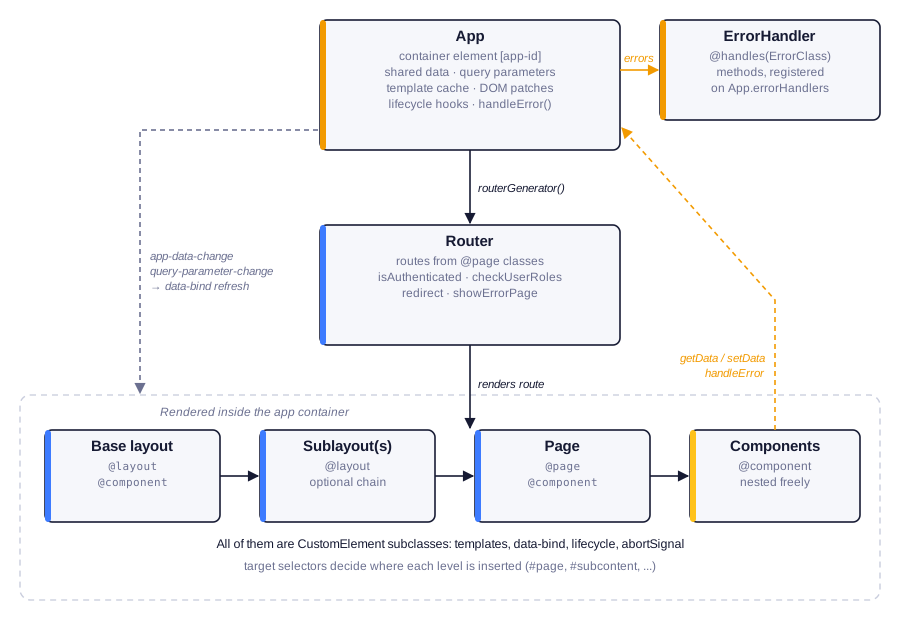
The App is created first. Its routerGenerator() method creates the Router, which
renders the route's base layout, any sublayouts and the page into the app's
container. Pages and layouts are ordinary components and can contain any number of further
components. All of them extend CustomElement.
Two kinds of communication flow back up:
- Components read and write shared state through the App (
getData,setData,updateQueryParameters). The App answers with DOM events (app-data-change,query-parameter-change) that make components refresh the affected parts of their markup. - Errors raised in components, the router or server-component requests are passed to
app.handleError(), which offers them to the registered ErrorHandler classes.
How components find the application
There is no global singleton and no dependency injection. When app.init() runs, the App stores
itself on the container element (container.app) and marks the container with an app-id
attribute. When a component initializes, it looks up its nearest ancestor with that attribute:
From then on this.app is available in the component, typed as your own application class. A
component outside the app container cannot initialize; it fails with
"Failed to detect application container".
Startup sequence
What happens, in order, when await app.init("#app") runs:
- Resolve the container. The argument can be a selector or an element. The App sets
container.appand a randomapp-id. - Start the template-cache cleanup timer (Template caching).
- Patch DOM prototypes (once per page; see below).
- Instantiate the error handlers listed in
errorHandlers. - Run
@lifecycle(BEFORE_INIT)hooks on the App, thenEXTENSION_INIThooks. - Create the router by calling
routerGenerator(). The router registers a click listener on the container and apopstatelistener onwindow. - Route the current URL. The router matches
location.pathname, authorizes it, renders the layout chain and the page, and waits until they have initialized. - Wait for all top-level components in the container.
- Run
@lifecycle(AFTER_INIT)hooks on the App.
When init() resolves, the first page is fully rendered.
The patched DOM
At startup the App replaces a handful of DOM prototype members:
- the
innerHTMLandouterHTMLsetters andinsertAdjacentHTML; setAttribute,getAttribute,removeAttribute,hasAttributeandtoggleAttribute;querySelectorandquerySelectorAllon bothDocumentandElement.
The patches change behaviour only where JoltUI needs it:
- HTML inserted inside a component is a template. If the target element belongs to a JoltUI
component,
innerHTML,outerHTMLandinsertAdjacentHTMLrun the string through the template engine with that component asthis, expand the@eventand:argumentshorthands, and attach event listeners. Outside components the native behaviour is untouched. :nameattributes are shorthands fordata-jolt-name.el.setAttribute(":mode", "dark")writesdata-jolt-mode, andel.getAttribute(":mode")reads it back. On a component host, changing such an attribute also refreshes markup bound toattr.mode.- Selectors understand the shorthand too.
querySelector("[:mode=dark]")is rewritten to[data-jolt-mode=dark]. JoltUI parses selectors with a bundled fork of css-what.
Because of these patches, ordinary DOM code inside a component behaves like JoltUI code. This
inserts a row whose @click handler is bound to the component's removeItem method:
this.querySelector("#list")?.insertAdjacentHTML("beforeend", html`
    <li>{{! this.newItem }}
        <button @click="removeItem">×</button>
    </li>
`);
The rendering pipeline
Whenever a component renders, it follows the same steps:
- Obtain the template string from
markup(), from the server (useServer), from the template cache or, for prerendered components, from the existing child markup. - Evaluate it with doT, using the component as
this. While compiling, JoltUI records the raw template of everydata-bindregion. - Expand shorthands:
@clickbecomesjolt-clickand:idbecomesdata-jolt-id. - Insert the HTML and tag the new elements with
data-parent-id(the component'shashId) anddata-render-time. - Hydrate: for every
jolt-<event>attribute, add an event listener that calls the named method on the component. - Child custom elements are upgraded by the browser and run their own initialization; the parent waits for them before it counts as initialized.
Data flow
Shared state lives in the App. Components never subscribe to a store explicitly; the template declares which regions depend on which data:
When code calls app.setData("user", u), the App dispatches an app-data-change event. Every
component listens to it, looks up the regions bound to app.user and re-renders only those.
The same mechanism serves query parameters (query.<name>), component attributes
(attr.<name>) and component-local @react properties. See Reactivity.
Error flow
Every place where JoltUI runs your code wraps it:
- event handlers and lifecycle hooks (
MethodExecutionError); markup()(RenderError);- component initialization (
ElementInitializationError); - link-click navigation (
RouteFailedError); - route matching and authorization (
RouteNotFoundError,AuthenticationError,AuthorizationError); - server component requests (
NetworkError,InternalServerErrorand others).
The wrapped error goes to app.handleError(). Each registered ErrorHandler inspects the error
and its cause chain and, if it has a matching @handles method, deals with it. If none does,
the error is rethrown so that it surfaces in the console. See Error handling.
Navigation
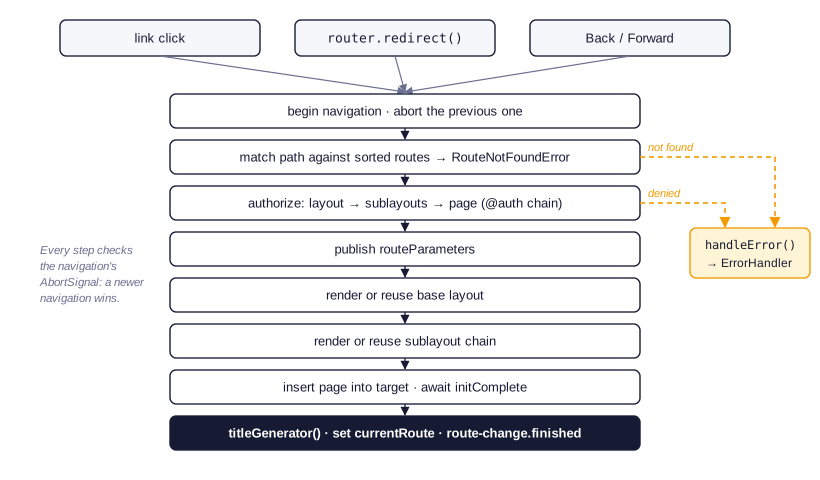
A navigation starts from a link click, a call to router.redirect() or the browser's Back and
Forward buttons. The router begins a new navigation, aborting any navigation still in progress.
It then matches the path, authorizes the whole layout chain, publishes the route parameters,
and renders or reuses the base layout, the sublayouts and finally the page. Every step checks
the navigation's AbortSignal, so the latest navigation always wins. See Routing
and Layouts.
What JoltUI does not do
- There is no virtual DOM and no diffing. Updates re-evaluate a template and replace the contents of a bound region or the whole component.
- There is no shadow DOM. Components render into their light DOM, so global style sheets apply directly.
- There are no nested route definitions. One page handles one route; composition happens through layouts and sublayouts.
- Element instances are not reusable after removal. A disconnected component has ended its lifetime (Cancellation).